
Building a robust cross-platform cloud save system is a notorious time-sink, one that even popular games skip because of the complexity involved. Handling local vs. cloud conflicts, session-locking across devices, and cross-platform account linking can swallow months of engineering, pulling you away from building and shipping your game.
But cloud saves matter, and it's 2026, why isn't this standard yet? How come I can't start playing Balatro on my PC and then pick it up on my Switch or phone whenever I want.
We wanted to change that here at LootLocker. We've written guides on how to do cloud saves in the past, but felt it could be even easier (and more natively cross-platform). So we built a drag & drop cross-platform cloud save system for Unity that handles it all: sync logic, backups, and platform account linking, right out of the box.
Set Up in Seconds
We designed this system to be as effortless as possible. You can initialize a fully automated cloud sync pipeline with a single line of code:
CloudSaves.Initialize(Application.persistentDataPath + "/savefile.sav");
Pass it your local save path, and LootLocker creates a companion metadata file, tracks changes, and manages the rest in the background.
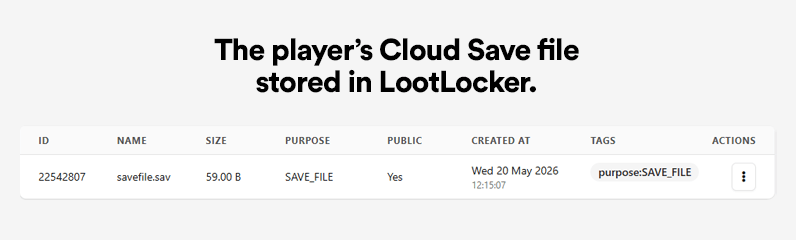
Every metadata and cloud save file is also accessible in the LootLocker web console, where you can view and manage them directly, rolling back to older revisions or uploading new saves by hand (handy for testing or customer support).
Advanced Conflict Context
Want to give players more context when a conflict happens, like their character name, level, or playtime? Pass an optional metadata path and a conflict display callback:
Everything Handled Automatically
Once initialized, the system runs on autopilot to protect player progress and keep data intact:
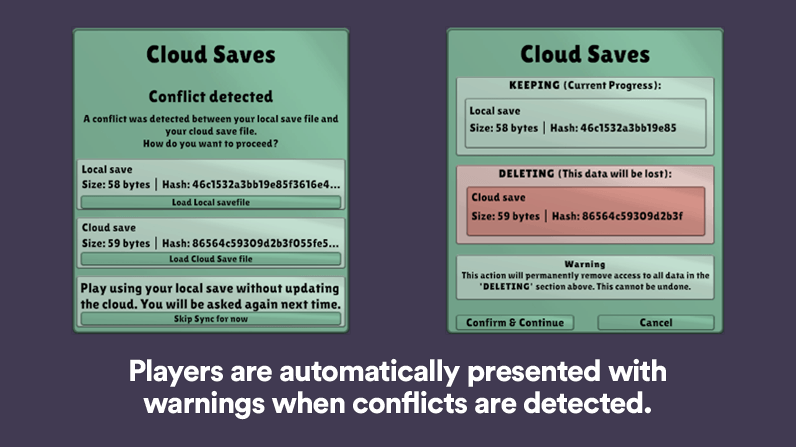
- Smart Conflict Resolution: Automatically detects when local and cloud files drift out of sync and prompts the player.
- Multi-Device Safety: Safely manages sessions when a player is active on multiple devices at once, preventing data corruption.
- Automated Backups: Continuously backs up player progress to the cloud.
- Status Tracking: A built-in overlay shows players whether their save is syncing, up to date, or offline.
Seamless Cross-Platform Account Linking
A cloud save system is only truly cross-platform if players can carry progress between ecosystems. To close that gap, we've paired cloud saves with a new Cross-Platform Connectivity Prefab powered by our Unified Player Account system.
This drop-in Unity UI component makes linking external platforms painless, especially on consoles:
- Scan or Click: Players press Connect and get a web URL or a QR code—perfect for playing on consoles.
- Secure Sign-In: They scan the code with their phone, sign in with their preferred identity provider, and the accounts are linked instantly.
Intelligent Account Conflict Handling
The biggest headache in cross-platform cloud saves is when a player already has data on both platforms before linking them.

Our connectivity prefab handles this natively. When a conflict is detected, the UI pauses and presents the player with their options. Because it pulls live data straight from the save files themselves, players can see exactly which character or progress they're choosing to keep so they never accidentally overwrite hours of hard work.
Cloud Saves & Cross-Progression That "Just Works"
Together, our new Cloud Save system and Connectivity Prefab give you a production-ready cross-progression ecosystem. Authenticate the player, pass the file path, and let LootLocker handle the rest.
Check out our updated Unity SDK documentation and drop cross-platform saves into your project today!