What's new.
A platform that gets better every week.
🎉 Unreal Server SDK v6.6.0 is released 🎉
🛒 This release adds the Catalog API for listing catalog items by ID, leaderboard manual reset CRUD endpoints, file-based pre-configuration for CI/CD pipelines, and an in-editor update checker. ⚠️ The default log level has changed from Display to Warning — set it explicitly if you need the previous behavior.
🎉 Unreal SDK v10.5.0 is released 🎉
🎮 Major release bringing Xbox Store IAP, multi-user session modes with hotseat support, player ban detection, and a new connection state check. Plus: catalog item lookup by ID, leaderboard upcoming resets, file-based pre-configuration for CI/CD, and an in-editor update checker. ⚠️ FLootLockerCatalogGroupMetadata is now deprecated.
🎉 Unity SDK v8.1.1 is released 🎉 🎮 Major release bringing Xbox Store IAP, multi-user session modes with hotseat and profile switching, player ban detection, and a new connection state check. Plus: catalog item lookup by ID, Cloud Saves and Universal Player Authentication prefabs, and credential obfuscation across 14+ sensitive fields.
We've completely redesigned the Player Page in the Web Console.
The new experience focuses on improving navigation, readability, and making it easier to understand everything associated with a player profile. Information is now presented in a cleaner and more structured layout, allowing support teams, developers, and live operations staff to quickly find the data they're looking for.
Whether you're inspecting player inventories, currencies, metadata, progressions, linked accounts, or other profile information, the updated Player Page provides a faster and more intuitive experience for managing players.
This redesign is part of our continued effort to make the Web Console easier to use and better suited for day-to-day operations.
Players can now be rewarded with Metadata.
Metadata Rewards allow you to write directly to a player's profile as part of any reward flow. This makes it possible to further personalize player experiences without requiring custom server logic.
Metadata Rewards are available anywhere rewards are supported, including Triggers, Leaderboards, and Catalogs, and support all Metadata types provided by LootLocker's shared Metadata framework. Progressions does not currently support this reward type.
Rewards currently perform an upsert operation, meaning new metadata keys will be created and existing keys with the same name will be overwritten. Increment operations are not currently supported.
Some example use cases include granting founder status, recording beta participation, tracking event attendance, or marking players as eligible for future campaigns.
Segments now support a new "Has Metadata Key" condition.
Unlike metadata conditions that compare values, the Has Metadata Key segment simply checks whether a metadata key exists on a player's profile, regardless of its type or value. The condition works across all metadata types, including Strings, Numbers, Booleans, Timestamps, JSON, and Files.
This makes it easy to build segments based on whether players have certain information stored on their profile without needing to know the exact value. For example, you could target players who have linked a creator code, participated in any beta test, or have any value stored under a specific metadata key.
Has Metadata Key can be combined with all other Segment conditions, making it easier to create audiences based on the presence of player data rather than its contents.
Player Metadata now supports a new Timestamp type.
Timestamp Metadata makes it easy to store dates and times directly in a player's profile. Timestamps can be written and read just like any other metadata type and integrate seamlessly with LootLocker's shared Metadata framework.
Common use cases include recording when a player last claimed a reward or when they completed a tutorial.
By adding a dedicated Timestamp type, developers no longer need to store dates as strings or convert them manually, making time-based data easier to manage and more reliable.

External Reward Campaigns allow you to create claimable rewards that players can redeem outside of your game through shareable links and QR codes.
Built on top of LootLocker Triggers, External Reward Campaigns make it easy to reward players through newsletters, live events, creator campaigns, social media, physical merchandise, and other community touchpoints.
Create a campaign from any Trigger, configure a start and expiry date, and LootLocker will automatically generate a hosted claim page, shareable URL, and downloadable QR code. Players simply authenticate using one of your enabled Unified Player Account providers and the reward is automatically granted to their account.
Use Cases
- Reward newsletter subscribers with bonus currency before a special event weekend
- Distribute event-exclusive rewards and giveaways through QR codes at conventions and live events
- Unlock cosmetics, DLC, or other content through physical merchandise and swag
- Give creators and community managers exclusive reward campaigns to share with their audiences
External Reward Campaigns are available now in the Triggers feature and include full support for shareable links, QR codes, campaign scheduling, and Unified Player Accounts authentication.
Leaderboards now support manual resets, giving you full control over when a leaderboard is reset and rewards are distributed.
Previously, leaderboard resets could only be configured on a recurring schedule. With this update, you can:
- Trigger a reset immediately from the web console
- Schedule a one-off reset for a specific time
- Name your resets to keep track of what each one represents
- Cancel pending resets before they execute
This is especially useful for community challenges, tournaments, or any event-driven scenario where resets don't follow a fixed cadence.
All reset management is available in the new Resets tab on each leaderboard in the LootLocker Web Console as well as through the Server API.
🎉 Unity SDK v8.0.0 is released 🎉 🛡️ The package is now signed for Open UPM supply-chain security! Remote sessions support a provider parameter for smoother account linking, asset listing can be filtered by context, and full API reference docs are live on ref.lootlocker.com. Bug fixes improve path handling and error reporting. ⚠️ Missions & Collectables have been removed.
🎉 Unreal SDK v10.4.0 is released 🎉 🚀 Brand-new HTTP execution queue for rock-solid request handling, remote-session QR codes rendered straight to texture, provider-targeted account linking, and full API reference docs on ref.lootlocker.com. Plus: Google Play Games connected accounts, context filtering for assets, and important stability fixes. ⚠️ Missions & Collectables have been removed.
🎉 Unreal Server SDK v6.5.0 is released 🎉 🏆 Increment leaderboard scores without reading them first, filter assets by context, and browse shiny new API reference docs live on ref.lootlocker.com — all in one update.
Segments now support targeting players using Metadata values attached to their player profile.
New Segment conditions include:
- Have String Metadata
- Have Number Metadata
- Have Boolean Metadata
Each Metadata type supports different qualifier operations, including exact matches, ranges, inclusion/exclusion checks, and boolean value checks depending on the selected Metadata type.
These new conditions can be used in both Triggers and Broadcasts to create more dynamic player targeting and personalized experiences.
Learn more about Segments in our documentation.

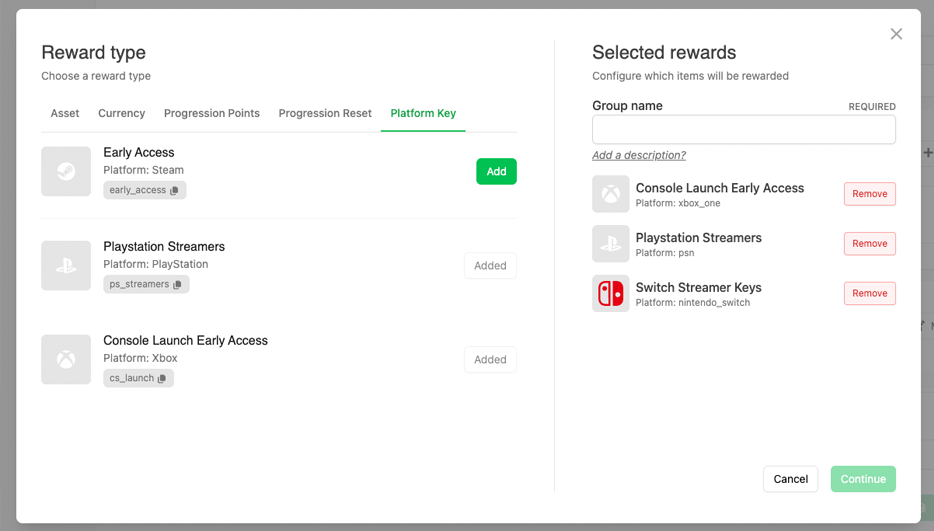
Platform Key campaigns can now be used as a reward type across LootLocker systems.
In addition to distributing keys through Squire, you can now reward platform keys directly through Progressions, Leaderboards, Catalogs, and Triggers. This makes it possible to automate key distribution as part of gameplay progression, events, campaigns, promotions, or community activities.
Rewarded keys can be surfaced directly in-game through the Game API or through the Squire Discord bot, creating a much more seamless player redemption flow across both games and community platforms.

LootLocker now supports Stripe as a third-party payment option, allowing you to sell assets, currencies, and progressions directly to players using your existing LootLocker Economy setup as one-time purchases or subscriptions.
Using Stripe Connect, you can connect your Stripe account to LootLocker and start offering purchases through Stripe while LootLocker handles the game-side commerce layer, including entitlements, transaction tracking, and support tooling.
This makes it easy to extend your existing economy beyond first-party platforms and virtual currency flows without building your own custom payment backend.
Learn more about Stripe support in our announcement blog post.

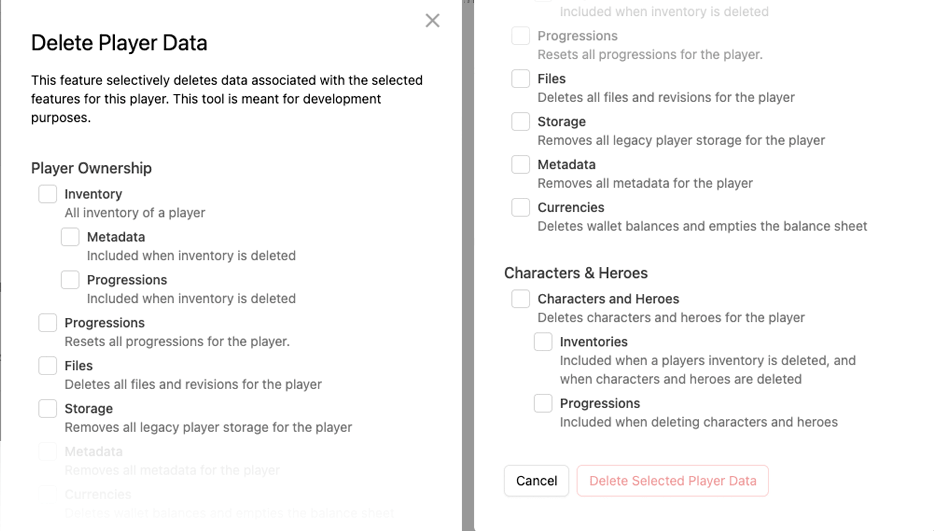
You can now selectively delete specific sections of a player profile directly from the Web Console.
Previously, player deletion actions were limited to removing an entire player profile. With this update, it’s now possible to remove individual categories of player data independently, including inventory, metadata, progressions, files, storage, currencies, characters, and heroes.
This provides significantly more flexibility for customer support, GDPR-related workflows, testing, and live operations management.
If you need similar deletion actions performed across your entire player base, please contact us directly.
All White Label Login emails are now sent from Auth.game instead of LootLocker.io.
This update applies to all authentication-related emails including account verification, password reset, and other White Label Login communication. The change helps further separate game-facing authentication flows from the LootLocker platform while providing a cleaner and more consistent player-facing authentication experience.

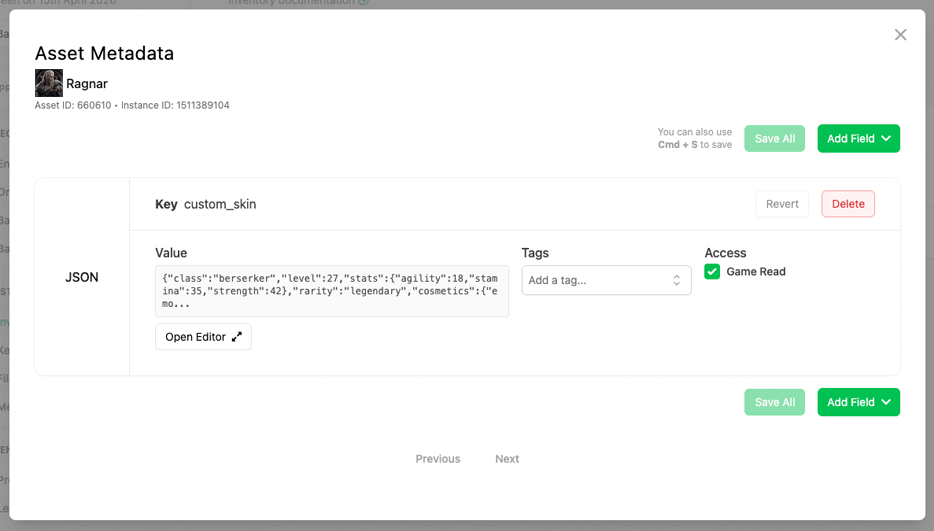
Asset Instances now support Metadata.
This means every unique instance of an asset can now store its own custom information using LootLocker’s shared Metadata framework. Metadata can be attached directly to individual asset instances and supports multiple data types including booleans, strings, numbers, JSON objects, and files.
Asset Instance Metadata can be updated dynamically through both the Game API and Server API, enabling more advanced inventory systems, persistent item state, procedurally generated items, durability systems, player customization data, and much more.

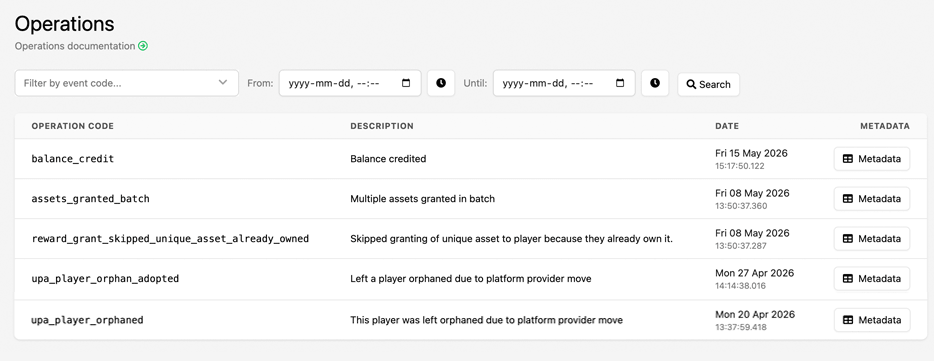
Finding specific player operations in the Player Manager just got much easier.
You can now filter Player Operations in the Web Console by both event code and date range, making it significantly faster to track down the exact operations you're looking for. Whether you're investigating player issues, reviewing economy changes, or auditing backend activity, the new filtering tools provide a much clearer view into player activity over time.

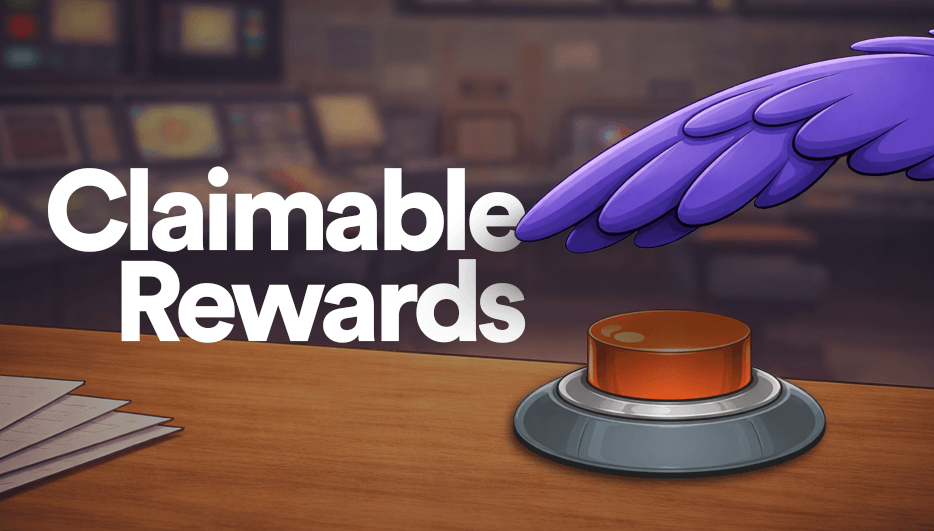
Squire now supports Claimable Rewards, allowing you to launch reward campaigns directly inside your Discord server.
Players can click Claim Reward directly from a Discord post to receive in-game rewards powered by LootLocker Triggers. By default, rewards can be claimed using a player’s Discord ID, with optional platform account linking through Unified Player Accounts (UPA) to connect rewards directly to in-game profiles.
Claimable Rewards can also be used before your game is live, with no LootLocker SDK integration required to start running campaigns.
🎉 Unreal SDK v10.3.0 is released 🎉 🛒 Major release introducing asynchronous purchases, Stripe Checkout sessions, refund capabilities, platform-specific friends filtering, inventory metadata support, and enhanced request tracing for improved purchasing and social features.
🎉 Unreal Server SDK v6.4.0 is released 🎉 🔧 Major release adding context listing, connected account management, enhanced request ID tracking with enriched response context data, plus comprehensive internal refactoring for improved stability and request tracing capabilities.
You can now view the status of player notifications sent from the Web Console directly on the player’s profile page.
Under the Notifications tab in Player Manager, all notifications sent to the player via the Web Console are listed along with their read status, making it easy to verify whether a notification has been retrieved by the player’s game client.
Learn more about sending and viewing Notifications in our User Documentation.

It is now possible to Ban Players permanently or temporarily from starting sessions in your game. This can be done through the Web Console by navigating to the player page, selecting Actions and then selecting Ban Player. It is possible to leave an optional note attached to the action, for example providing a reason for the ban.
A banned player’s player page will clearly display that the player has been banned, and provide buttons to view notes or to unban the player.
You can now prevent specific players from starting new game sessions directly from the LootLocker Web Console.
To ban a player:
- Navigate to the player’s profile.
- Open the Actions dropdown in Player Information
- Select Ban Player and select the optional ban duration.
- Add an optional internal note, such as the reason for the ban.
Once banned:
- The player will be blocked from starting new sessions.
- The player profile will clearly display their banned status.
- You can view associated notes or reverse the action using Unban Player.
This provides a straightforward and immediate moderation tool for customer support or community managers for managing disruptive or cheating players. More information can be found in our User Documentation.
You can now apply Segments directly to Triggers, ensuring that only players who qualify for a specific segment are able to execute a trigger.
This gives you precise control over who can activate rewards, content, or game logic, unlocking powerful new use cases, such as:
- Platform-specific rewards (using a Played On segment)
- Playtime-based rewards (using a Playtime segment)
- Re-engagement rewards for lapsed players (using a Last Seen segment)
And far more.
With Segments and Triggers working together, you can tailor live operations and reward logic to exactly the players you want to reach.
Explore the updated Triggers in the Web Console today.

We’ve added a new Insights tab to the Progression view.
You can now see:
- Total Participants
- Average Points
- A Players by Tier graph for a clear breakdown of distribution
This makes it easier to understand overall engagement and player performance at a glance.
You can now grant catalog items directly to a player from the Catalogs table. Simply select "Grant to Player," enter the player's ULID from the action menu, and the item will be delivered instantly.
This change is meant to streamline item distribution for player support workflows.
What's included:
Catalogs
What’s included:
- New Grant to Player option for each catalog item, found within the action menu.
- Simple, guided modal for entering the player’s ULID
- Instant feedback when the item is granted

We’ve released Squire, a new Discord bot that connects your Discord community directly to your game using LootLocker.
Squire allows you to link Discord members to real player platform IDs, distribute and track Platform Keys securely, and push in-game Broadcasts directly to Discord for unified player communication.
Initial features include:
- Platform Key distribution and redemption through Discord
- Player verification via Unified Player Accounts (UPA)
- Tracking which redeemed keys resulted in real gameplay
- Pushing in-game Broadcasts to Discord channels
- Configurable roles, channels, and message styling
Squire is available now and can be installed directly from the LootLocker Web Console. More information can be found in our documentation.

We’ve overhauled the Broadcast Segments experience to make building audiences faster, clearer, and more intuitive.
Segment conditions are now created using a natural-language flow instead of abstract terms. Rather than choosing from unclear fields like "Attribute" and "Operator", you now build segments as readable sentences starting with “Players who…” and extending them with “and” when adding additional conditions.
The result is segments that are easier to understand at a glance, harder to misconfigure, and quicker to iterate on, especially as segments grow more complex.
Broadcast documentation has also been updated to reflect these changes.

You can now export data collected through the Player Insights feature directly from the Web Console.
Use the Export action next to any supported insight to generate a CSV file. In the export modal, select the game(s) you want to include and define the date range, then click Download Export to immediately download the file.
Supported data sources:
- Daily Active Players (DAP)
- New Players
- Monthly Active Players (MAP)

We've released Presence, a new feature that reports when players are online and actively playing your game across platforms.
- Basic Presence (available to all users) reports real-time concurrent players (CCU) and session durations with minimal implementation.
- Rich Presence (paid feature) extends this with custom in-game states, detailed session timelines, and deeper insight into player behavior for analysis and customer support.
Presence and Rich Presence are available today with Unity SDK and Unreal SDK support.
Don't forget to check out Presence documentation as well.

Users: Can we have dark mode?
LootLocker: We have dark mode at home
(But if you want to rebel, click your profile pic in the top right and pick your own mode. Go on — live dangerously.)

With Player Insights, you can now visualize essential player metrics directly in your LootLocker web console, giving you an instant overview of your game’s health and audience composition.
LootLocker currently provides the following core metrics:
- Platform Distribution: Total players and a breakdown of which platforms they’re playing on
- Daily Active Players: Unique player sessions per day
- New Players: Number of new players joining each day
- Monthly Active Players: Total active players per month
Log in to your LootLocker Web Console today to see your Player Insights in action.

We've launched Player Segments for Broadcasts, allowing you to target messages to specific groups of players based on:
- Their platform (Steam, Nintendo, PlayStation, etc.)
- When they were last seen in-game
- The date they were first seen
Here are some examples of how segments can be used:
- Announcing platform-specific events or updates to players on a particular console
- Promoting sales or discounts that only apply to certain groups
- Sending maintenance notifications only to players who will be affected
- Re-engaging players who haven’t logged in for a while with information about what's new in the game
More segmentation rules are coming soon to help you personalize Broadcasts even further.
Added pagination to the Relationships tab for improved performance and usability with large datasets. Enhanced catalog management with detailed information and fuzzy search currency selection across components.
What's included:
Relationships
- Paginated Tables: Display relationships with configurable items per page (5, 10, or 25)
- Easy Navigation: Move between pages using previous/next buttons, page number links, or a page selector dropdown
- Persistent State: Page state is maintained across navigation via URL-based pagination
- Flexible Per-Page Selector: Control how many relationships display per page
Catalogs
- Catalog Details Panel: Display catalog key and ID on the items page with easy copy-to-clipboard functionality
- Fuzzy Search: Find currencies by name (e.g., "gold"), code (e.g., "GLD"), or ID with intelligent search across price creation and balance management
- Streamlined UI: Cleaner modal layouts with improved visual hierarchy.
Faster currency discovery across all workflows.
🎉 Unity SDK v6.4.0 is released 🎉 🚀 New: Epic & Google Play Player Lookup support! 🎮 Bug fixes include: proper catalog key usage in ListCatalogItemsV2, improved session handling, better parameter management, and enhanced stability for callback exceptions.
You can now see when a player has requested to delete their account and when the deletion is scheduled to occur. This information is now available in the Player Overview in the Web Console.
From this new notificaiton you can also cancel the deletion request if needed, or delete the player immediately.

🎉 Unreal SDK v10.0.0 is released 🎉 Major release featuring Epic/Google Play Games player lookup, request ID tracking with enhanced context data, automatic session token refresh fixes, plus a comprehensive internal refactor for improved stability and future maintainability.
We’ve added in-game notification management to help players stay up to date and keep their inbox organized.
Here’s how it works:
- Retrieve all unread notifications for the logged-in player
- Find specific notifications using keys like trigger, purchase, or custom type
- Mark notifications as read once viewed
Supports notifications from triggers, catalog purchases, Twitch drops, and custom server or admin events.
We’ve added an Admin Player Operations Log to help you track actions taken on player accounts for better transparency and auditing.
Here’s how to use it:
- Go to the player’s page in the console and click the Audit Log tab
- View a detailed history of admin actions
- Logged actions include everything from granting assets to editing leaderboard scores
Exciting news! We’ve just dropped incremental scores for leaderboards, allowing you to update player scores by a modifier instead of having to fetch, increment, and then send us the new score.
This can be useful for tracking ongoing progress, like completing levels or earning points during a session.
You can update scores via our Game API or directly through the SDK.
We've added a Last Seen value to session starts — giving you an easy way to see when a player was last active.
This value can be used in a variety of ways, like tracking engagement or rewarding login streaks.
This value is returned from all of our start session endpoints under the key last_seen, in player metadata with the key ll.last_seen or can be accessed through the SDK on session start.
🎉 Unity SDK v6.3.0 is released 🎉 🚀 Exciting updates! Introducing Broadcasts for tailored player communication and Session Optionals for adding metadata like time zones. Plus, a new Time Zone converter for smoother broadcasts. Don't forget to migrate to the new ListCatalogItems v2! Read more: https://lootlocker.com/blog/preview/introducing-broadcasts-a-new-way-to-reach-your-players
🎉 Unreal SDK v9.6.0 is released 🎉 🚀 Exciting updates! Introducing Broadcasts for tailored player communication and Session Optionals for adding metadata like time zones. Plus, a new Time Zone converter for smoother broadcasts. Don't forget to migrate to the new ListCatalogItems v2! Read more: https://lootlocker.com/blog/preview/introducing-broadcasts-a-new-way-to-reach-your-players

Today we have launched Broadcasts, a new LootLocker feature that helps you connect with your players more directly than ever.
With Broadcasts, you can schedule and deliver localized messages to players across one or more of your games. Each broadcast can include text, images, actions, and custom key–value pairs, giving you control over how and where messages appear in-game, whether as a news ticker, a patch notes screen, or a dedicated message board. Broadcasts can also be hidden to the player, providing you with a great way to manage scheduled game configs.
They’re ready to implement today in Unity and Unreal games with full documentation available as well.
🎉 Unity SDK v6.2.0 is released 🎉 Exciting updates include new account connections for Epic, PlayStation, Twitch, and Discord! Enjoy enhanced performance with customizable asset filtering and UGC files are now functioning. Note: some deprecated methods have been removed. Check the full changelog for details!
🎉 Unreal SDK v9.5.0 is released 🎉 More connected account options (Epic, PlayStation, Twitch, Discord), selective simple asset filtering for big performance wins, PlayStation Network v3 support, unified PlayStation auth/session flow, Google auth code retrieval for Play Games integration, plus a UGC file handling fix.
🎉 Unity SDK v6.1.0 is released 🎉
🚀 Exciting update! We've added PlayStation Network v3 support to the SDK. Plus, we've streamlined the authentication process by combining player verification and session start into one method: VerifyPlayerAndStartPlaystationNetworkSession. Check out the full changelog for details!

We’ve just released some updates to the console dashboard!
Here’s what has changed:
- Links to our SDK Quick Start Guides for Godot, Unity, and Unreal
- You can now see your Monthly Active Users statistics for the last 3 months
- Cleaned up clutter for a simpler, more focused dashboard
Do you have more ideas on how we can make it even better? Contact us on Discord!

LootLocker now supports cross-platform Friends and Followers!
With LootLocker Friends, your players can:
- Send friend requests using a unique 8-character ID
- Accept or decline incoming requests
- Remove friends at any time
- Block or unblock players to prevent unwanted contact
And beyond these core features, LootLocker Friends also supports Followers, a one-way connection where a player can follow another player without approval. The followed player is not notified but can see who’s following them and choose to block followers.
This feature is documented and integrated across both Unity and Unreal SDKs, so you can get started quickly and deliver a seamless social experience to your players—no matter what platform they’re on.
🎉 Unity SDK v6.0.0 is released 🎉 Exciting updates: LootLocker now supports Epic IAPs! Plus, we've introduced a Friends system, score incrementation on leaderboards, and simplified asset listing. Check player last seen times and progression IDs. Bugs fixed for smoother sessions.
🎉 Unreal Server SDK v6.3.0 is released 🎉 Exciting updates! You can now create players from the server, enjoy a new Friends system, use a simplified asset listing for faster performance, and access progression IDs in responses. Check out the full changelog for more details!
🎉 Unreal SDK v9.4.0 is released 🎉
Epic IAP support arrives alongside the new Friends system, atomic leaderboard score incrementation and rank querying, faster simple asset listing, plus session last_seen and progression ID fields for better player state insight.
We have made some updates to the leaderboard Web Console UI as part of our ongoing work improving and streamlining the user experience.
Changes
- Removed the modal for creating a leaderboard: The modal has been replaced with a dedicated page for creating leaderboards.
- New leaderboard creation page: The new creation page has a new design which better explains each field and its purpose
- Update the leaderboard settings tab: The settings tab for a leaderboard has been updated to match the new design as the creation page.
To read more about leaderboards and how to use them, check out our documentation.

We’ve added a Player Name Blacklist that lets you block inappropriate or unwanted player names quickly and easily.
Here’s how to use it:
- Go to our new Player Settings page
- Enter or paste your names into the Blacklisted Names field, one per line
- Save your changes

You can now use Discord as an authentication platform for player sessions, available in both Platform Login and Unified Player Accounts..
This gives players a fast, familiar way to sign in with their Discord accounts and gives you powerful new tools to build more connected experiences.
Here’s what you can do with Discord auth:
- Let players sign in with Discord for seamless access
- Link existing player accounts to Discord to take advantage of our cross-platform features
- Make your games playable through Discord Activities
- Build Discord bots that interact with your game via our APIs
Bring your game to where your players already hang out: in Discord. With bot integration, you can create rich, community-driven experiences like:
- Automating support by accessing player data through Discord IDs
- Creating fun commands to view in-game stats
- Letting players claim in-game rewards by interacting with your community
- Syncing in-game groups with Discord roles or channels
- Notifying players about in-game events or updates
The possibilities are endless.
You can enable Discord authentication in the Platform settings and Unified Player Accounts settings on our console.
🎉 Unity SDK v5.3.0 is released 🎉 This release adds Google Play Games Services and Discord authentication, new convenience methods for player state and data management, and metadata upsert support. Plus, a performance fix for string list allocation in the HTTP client. Full details below!
🎉 Unreal SDK v9.3.0 is released 🎉 This release introduces Google Play Games Services and Discord authentication, new convenience methods for managing player state and data, and support for metadata upsert operations. Plus, a bug fix ensures the default user is set correctly when player states are cleared or sessions end. See the full release notes below!
🎉 Unreal Server SDK v6.2.0 is released 🎉 Version 6.2.0 of the Unreal Server SDK adds support for listing leaderboards and the convenient "Upsert" Metadata action 😁.
We've released a few updates to our code input page on the player facing auth.game site. Code input is often the first page players see when interacting with Unified Player Accounts, so making sure it works well is important.
Improvements
- We no longer clear the code if the user mistyped it: This allows users to correct their input without having to re-enter the entire code.
- Better keyboard support: The backspace key now stays in the field you pressed it in, allowing you to correct mistakes without having to click back into the field.
- Hold backspace to delete: You can now hold the backspace key to delete multiple characters at once, making the fields behave more intuitively.
- Minimize excessive submits: We sometimes sent the code too often while the user was trying to correct an error in their input. This update reduces the number of submits to only when the user has finished entering their code.
If you have any feedback on these changes, please let us know! We are always looking to improve the user experience for your players.
To read more about Unified Player Accounts, check out our documentation.
We've just released several exciting quality-of-life improvements to the metadata feature in our web console.
Here’s what’s new:
- Save and New Field buttons at the bottom of the page for easier access
- A new Ctrl/Cmd + S keyboard shortcut to save metadata changes quickly
- An unsaved changes popup to help you avoid losing progress
- New fields are now added to the top of the list for better visibility
- The JSON code editor has been updated for a cleaner, more streamlined look
- Field deletion has also had a makeover
These updates are designed to make managing metadata faster and more efficient. Got any suggestions? Feel free to let us know on our Discord!
You can now add custom tags to files for both players and assets — right from the web console or via the Admin API. This makes it easier to organize your files and build more personalized game experiences.
Here’s some inspiration for file tags:
- Mark save files for beta testing
- Tag items to appear only during special events
- Group weapon skins for bulk updates
- Add files to a holiday event with a single tag
Whether you're managing seasonal content or segmenting players, tags give you more control and flexibility.
You can add or update tags directly in the console, or use the Admin API:
Today we're launching support for Xbox in our Unified Player Accounts feature, allowing players to link their Xbox accounts.
This update adds Xbox as a provider on the auth.game site, for both Remote Login and Account Linking flows.
If you want to Implement Xbox account linking in your game, please reach out on email or on our Discord.
🎉 Unity SDK v5.2.0 is released 🎉
Exciting updates! 🎉 The LootLocker extension is revamped for easier settings management, plus check out the new Log Viewer with color-coded, summarized logs. Remote Sessions now auto-fetch IDs, and you can get game configuration info with GetGameInfo. Also, new methods for certification handling and Default Loadouts! 🚀
🎉 Unreal SDK v9.2.0 is released 🎉 Good things incoming! 🎉 A completely new Log Viewer with color-coded logs and error summaries, improved logging options, new GetGameInfo method, character types now include default_loadout, and a bug fix for character asset usage.
🎉 Unreal Server SDK v6.1.2 is released 🎉 Let's go 🎉 Meet the new Log Viewer: color-coded logs, error summaries, and handy links! Plus, logging is now supercharged. Set log levels, save logs to file, and more. Debugging LootLocker just got way more simple!
Today we're releasing Currency Multipliers.
You can now add a multiplier to a currency in a player's wallet. When earning a currency through rewards, the multiplier will be applied to the amount earned.
Adding multipliers can also have a time limit, so you can reward players with a temporary boost.
Multipliers can be added manually through the player page in the LootLocker Web Console, or through the Server API.
🎉 Unity SDK v5.0.0 is released 🎉 This version brings a major new feature: multi-user support, enabling use cases like local multiplayer and easier account linking. We've also enhanced Connected Accounts to better support linking across various platforms. Wallets now fully support currency multipliers, and the SDK allows for reading and filtering custom notifications defined by your game. All responses now contain a context structure with request data. Finally, the refactored HTTP stack is out of beta, providing a more stable and consistent experience, alongside various bug fixes including improved Steam store notifications.
🎉 Unreal Server SDK v6.0.0 is released 🎉 This version introduces Custom Notifications, enabling your server to send in-game news and asynchronous rewards to players. Currency Multipliers are now fully supported in wallets, and you can now Get Assets by Context as well as list UGC assets from the server API. Logging outside of the editor is now configurable for easier issue diagnosis. Additionally, all query and path parameters are now URL encoded, and character IDs are included in hero responses.
The asset_filters property for listing assets now supports up to 10 filters.
We've updated our Connected Accounts feature to better support link flows in more complex scenarios.
- You can now use auth.game to link accounts to the player, without needing to use the old
connectendpoints. - When linking, we will hide the login buttons for providers already linked for the player.
- The ability to move multiple providers between player accounts.
With this new functionality it's now possible to better link providers directly from the game client. We've also greatly improved the experience for games that wants to implement merging of accounts.
We've also added support for the following providers:
- Steam
- Epic Games
To read more, check out our updated documentation.
Today we've released reference documentation for the API we use to power auth.game. You can use this API to for Player Impersonation, to create your own alternative to auth.game or to set up a complex account merging flow when used in conjunction with the Server and Game APIs.
This documentation brings all the same benefits mentioned in New Reference Documentation last week.
You can find this reference documentation here: ref.lootlocker.com/auth-client.
Today we're launching an update to our reference documentation, which brings multiple improvements:
- Use it directly from the browser: You can now call endpoints directly from the browser, making it easier to test and explore the API.
- Improved Navigation: The new documentation has a more intuitive structure, making it easier to find the information you need.
- Enhanced Search Functionality: The search feature has been improved to provide more relevant results and faster access to the information you need.
These docs are for people who want to explore the API's directly or does not use one of the already supported Game Engines. The documentation for our engine SDKs can be found here.
The new reference documentation is available for all our APIs:

Twitch drops support have landed in LootLocker!
- Players can link their Twitch account to their LootLocker account.
- Players can claim drops from Twitch streams and receive them in game.
- Easy to set up and configure.
You can read our announcement here.
🎉 Unity SDK v4.0.0 is released 🎉 New features include player name lookup, the ability of getting progressions from another player, and a convenience lookup method for twitch drops. This version of the SDK also contains a spring cleaning of previously deprecated methods and symbols. See the release notes below for more information.
The Game API have been updated so you can now list assets in the order that best suit your game using the /game/v1/assets/list endpoint.
There are two new query parameters that can be sent.
order_by which is the field you want to use for ordering your assets. Valid options are name, created_at, updated_at, and id.
order_direction is the direction you want to order your assets. Valid options are ASC and DESC.
🎉 Unreal SDK v7.0.0 and Unreal Server SDK v5.0.0 are released bringing major capability improvements 🎉 Exciting updates! We've released a major capability upgrade to our Unreal SDKs adding Multi user support to the Game SDK and Token exchange & Impersonation support to the server SDK.
Multi User Support
This version of the Game SDK sees a major and central feature update in giving the SDK support for multiple users 🎉👥. This enables a few advanced use cases such as:
- LootLocker supported local multiplayer. Build your couch co-op adventure, your fighting game, or your turn based board game with each player connected to their LootLocker user.
- User Profiles. Support a user selection screen remembering all players that have played on the device and allow for seemless switching between them.
- In depth account linking. When linking account, this will allow you in a client setting to display data from all the accounts involved in the linking. Or even moving data between them. All as you envision it.
Token Exchange and Impersonation
This version of the Server SDK turbo charges your game servers. Together with the multi user support update in the Game SDK this is a major capability boost for the SDKs. Token Exchange lets you exchange an active game session token for a new one (keeping the old one active as well). Impersonation lets you get an active game session token for any player using their ulid. This means that you can now in a server context keep game api sessions for all active players and lets the server access the full power of the game api. Use this to for example:
- Call security. Move code for things like purchasing, progression point submits, invoking triggers, or submitting scores out of the client context and let the server execute that functionality on the players behalf.
- Expanded features. Use methods in a server context that don't yet exist in the server api.
- Responsibility Distribution. Offload code from your clients to a server context.
While Game merging has been an integral part of LootLocker since it's inception, over time it's proven error prone and hard to use.
We've made the hard decision to deprecate the feature and hide it for all new games. If you have an existing game that uses the feature it will continue to work as before, until we can replace it with a better solution.
This also means new games only have 1 environment available.
So how will you be able to run a development and live version of your game?
The recommended approach is to create 2 games in LootLocker, one for development and one for live. While this solution is not perfect, our experience is that it works better than the game merging feature.
We know this is not ideal, but we believe it is the best solution for the time being. We are working on a better solution that will allow you to have multiple environments for your game, and we will keep you updated on our progress.
We have expanded the information shown in the Console for Player Inventories. The inventory is now ordered by the date the player received the asset instance, and a source field has been added to indicate how the player received the asset instance.
The Server API has been updated to allow you to create players using the new /server/player endpoint.
This is useful if you want to create players in your game server and then use the LootLocker API to manage their inventories, rewards, and other features.
You can now use the numeric Asset IDs as input when searching for assets in the LootLocker Console.
It is now possible to remove promoted UGC from the Game API. Calling the delete endpoint even for promoted UGC will no longer return an error.
The players pages have received the following updates:
- Greatly improved loading times for the players list page.
- Moved all/recent + pagination to the URL, making it easier to share links.
- Fixed an issue where the player page would load the wrong data when switching between all and recent players.
🎉 Unreal SDK v10.1.0 is released 🎉 Major release introducing Presence system with real-time websocket connections, improved inventory listing performance, latency statistics, and expanded catalog support for Epic Games, PlayStation, and Stripe platforms.
🎉 Unreal SDK v5.3.0 is released 🎉 Exciting updates! Introduced new Player Info endpoints, enhanced Player and Asset Metadata, and streamlined UGC creation. Get specific currency details easily now. Steam auth is smoother, and asset contexts can handle multi-equip. Note deprecations for cleaner integration. Check the full changelog!
🎉 Unreal Server SDK v3.3.0 is released 🎉 Exciting updates! You can now schedule leaderboards via the Server SDK, access leaderboard ULIDs for enhanced interactions, and leverage versatile metadata for both players and assets. Dive into the full details in our changelog!
🎉 Unity SDK v3.6.1 is released 🎉 New features include GetCurrencyDetails for specific currency info and enhanced leaderboard data returning ULIDs for better metadata handling. Bug fixes: UnEquipIdAsset methods now function correctly. Note: Transition from full player storage to Player Metadata is recommended.
Squashed a bug in the Admin API which would in some circumstances result in drop table grants not saving correctly.
You can now equip multiple Asset Instances in a single Context. This is great if your game requires players to have for example 2 active abilities at the same time.
While there are API changes associated with this, you can use it without updating the SDK or changing your implementation. The only downside is that you will not be able to programatically see how many instances you can equip in a context.

A new feature has been added to the Web Console that allows you to change player names in the web interface. This is useful for moderation purposes or while testing your game.
To change a players name, head to the Players Page, select a player and click their name in the top of the page.
We've released a new Steam authentication endpoint with improvements to both flow and stability.
The improvements feature 2 changes:
- A simplified authentication flow, combining verification with starting a session into a single endpoint.
- New internal retry logic, which will automatically retry failed requests to the Steam Servers.
If you're using the Unity or Unreal SDKs, you do not need to make any changes, if you're using VerifyPlayerAndStartSteamSession to start sessions.
For people doing verification and session separately, the old endpoints will keep working, but we recommend switching to the new endpoint for better performance.
The new endpoint is available at POST /game/session/steam.
LootLocker now has a Notifications system to help your game track and deliver important updates from features like Rewards, Triggers, Leaderboards, and Progressions. Notifications are queued and can be consumed by the game, ensuring players never miss a critical message.
Learn how to make use of Notifications with our documentation.

We have re-released the Triggers feature with a complete overhaul, now built with improved performance, stabiliity and integrated with the Rewards system. The updated Triggers support both limited and unlimited activations, enabling more flexible reward scenarios.
Check out our updated documentation to learn how to implement Triggers in your game.
Features
- Triggers 2.0 🕹️ - We’re excited to announce the re-release of one of LootLocker’s most versatile features—Triggers! This feature has undergone a complete overhaul and is now fully integrated with the same cross-feature rewards system that powers all our latest features. Triggers let you create and manage in-game actions tied to specific rewards, opening up countless opportunities to engage your players. Read more here
- Notifications 💬 - Notifications serve as a shared system that integrates seamlessly with multiple features, including Rewards, Catalogs, Progressions, and Triggers. Acting as a central hub, Notifications track and communicate important player-related updates to the game, ensuring players stay informed about significant events and changes. Read more here
- .com - The LootLocker api has transitioned to .com instead of .io in preparation for an eventual potential phase out of the TLD.
- The version of the LootLocker SDK is now logged at start up time to help when reaching out to the team for support.
- All session responses now contain the wallet_id of the player.
- The define symbol
LOOTLOCKER_DISABLE_EDITOR_EXTENSIONhas been added so that it is possible to disable the LootLocker editor extension.
Bug Fixes
- The LootLocker editor extension no longer logs out on compiles and builds.
Deprecations
- With the introduction of Triggers 2.0, the old triggers system is deprecated. Adressing this will require you to re-configure your triggers in the new triggers configuration. To do this, please refer to our documentation. Once you have done this, simply call the new
InvokeTriggersByKeymethod in place of theExecuteTriggermethod. For a deeper understanding of using triggers in game, refer to our documentation. - Group leaderboard rewards no longer contain the metadata field as it's no longer returned from the backend.
Features
- Leaderboard Archives - LootLocker leaderboard archives are now supported by the Server SDK.
- SDK Version logging - The version of the LootLocker Server SDK is now logged at start up time to help when reaching out to the team for support.
- Add player session token lookup - You can now look up a player using their session token. Use this to verify that a client token is indeed for the player that the client says they are.
- Succesful request logging - When configured as very verbose and in the editor, the SDK will now log successful requst data as well.
- .com - The LootLocker api has transitioned to .com instead of .io in preparation for an eventual potential phase out of the TLD.
Bug Fixes
- The array in Universal Inventory response is now correctly named, handling json parsing correctly
- The Asset Instance Storage operation responses are now single items making json parsing function correctly
- The character inventory and hero inventory requests now work, the endpoints were incorrectly named
Features
- Triggers 2.0 🕹️ - We’re excited to announce the re-release of one of LootLocker’s most versatile features—Triggers! This feature has undergone a complete overhaul and is now fully integrated with the same cross-feature rewards system that powers all our latest features. Triggers let you create and manage in-game actions tied to specific rewards, opening up countless opportunities to engage your players. Read more here
- Notifications 💬 - Notifications serve as a shared system that integrates seamlessly with multiple features, including Rewards, Catalogs, Progressions, and Triggers. Acting as a central hub, Notifications track and communicate important player-related updates to the game, ensuring players stay informed about significant events and changes. Read more here
- .com - The LootLocker api has transitioned to .com instead of .io in preparation for an eventual potential phase out of the TLD.
- The version of the LootLocker SDK is now logged at start up time to help when reaching out to the team for support.
- All session responses now contain the wallet_id of the player.
Bugfixes
- Hero loadout now correctly contains an array of loadout items instead of a single loadout
Deprecations
- With the introduction of Triggers 2.0, the old triggers system is deprecated. Adressing this will require you to re-configure your triggers in the new triggers configuration. To do this, please refer to our documentation. Once you have done this, simply call the new InvokeTriggersByKey method in place of the ExecuteTrigger method. For a deeper understanding of using triggers in game, refer to our documentation.

Today we launched a brand new cross-system feature, Metadata. Metadata allows you to store additional, custom information related to various LootLocker features, such as Progressions, Leaderboards, and Catalogs.
This data lets you add context or functionality to these features, going beyond the default settings. For example, you might use Metadata to store map details for a leaderboard or to attach an image to an item in your in-game store.
Check out our documentation to learn how to implement Metadata in your game.

Today we launched a brand new feature, Feedback. The Feedback feature allows you to create and manage reports across three different core LootLocker systems: Players, UGC, and the Game itself. Learn more about this feature in our announcement post.
Check out our documentation to learn how to implement Feedback in your game.

We have updated how errors in the LootLocker web console are displayed.
When recieving an error you now are provided with plain-text information about what went wrong as well as a Trace ID that you can copy and share in Discord so that we can help fix the problem.
A new feature has been added to the API that allows you to specify a list of domains that are allowed to make requests to the API. This is useful if you want to restrict access to the API to only your own domains.
Documentation can be found here.
We have exposed a new setting in the LootLocker Console to allow you to configure whether or not the player name should be updated from the Identity Provider (eg. steam) when a session starts.
This is useful for games that do not want to update the player name on every session start, but only when the player explicitly changes their name in the game.
This setting is available in the Console under in "Game Settings", under the "Misc" tab. Look for "Preserve Player Names on Session Start".

It's now possible to create reward groups in LootLocker.
- Reward groups allows multiple rewards to be awarded to a player at once.
- This is currently available for catalogs and leaderboards rewards.
To learn more you can read our announcement post.
🎉 Unreal SDK v9.0.0 is released 🎉
This version introduces support for reading and filtering custom notifications, allowing you to notify players of in-game rewards, news, and more. This release also includes a crucial bug fix for Epic Games account connecting/disconnecting, updating the platform string to epic_games for proper functionality.

An update to leaderboards have been released, allowing for scheduling of resets and rewards.
- CRON expressions can be used to schedule resets.
- Rewards can be awards to players based on their leaderboard position.
To read more about leaderboard scheduling you can read our announcement post or go straight to the documentation.
White Label Login
Bug Fixes
- Fixed an issue where an unrelated topbar would show on the reset password and verify user pages
- Fixed an issue where the game logo would not show on the reset password page
Console
Changes
- The LootLocker Console is now response, allowing you to manage your game from any device, anywhere.
Unity SDK
Changes
- Refresh Remote Sessions: Remote sessions now provide a refresh token that can be used to refresh the session without fully re-authorizing.
- Grant and Remove Assets You can now grant and delete assets from a player directly from the game if you allow it in the console.
Bug Fixes
- The catalog now correctly handles the pagination cursor.
Continuous Integration
We have significantly improved our continuous integration and testing. Here for example is the run for this release: https://github.com/lootlocker/unity-sdk/actions/workflows/run-tests-and-package.yml
Unreal SDK
Changes
- Refresh Remote Sessions: Remote sessions now provide a refresh token that can be used to refresh the session without fully re-authorizing.
- Grant and Remove Assets You can now grant and delete assets from a player directly from the game if you allow it in the console.
Bug Fixes
- The catalog now correctly handles the pagination cursor.
Unreal Server SDK
Bug Fixes
- BREAKING CHANGE, moved all of the header files to the public folder. You will no longer need to use the
#include "LootLockerServerSDK/Private/ServerAPI/<file>.h;include line. Instead use#include "LootLockerServerSDK/Public/ServerAPI/<file>.h; - Fixed uninitialized parameters
- Added unit tests
Unreal SDK
Unreal SDK v3.1.0 released
Changes
- Progression Currencies - 🪙 Currencies can now be rewarded from progressions 🎉
- Session Leasing - 🎁 You can now lease a session on your client. You will get a url and a qr code that can be used by the same or another device to authorise the session.
Bug Fixes
- RemoveAssetFromHeroLoadout is working again
- Packaging has been failing for certain platforms due to LootLockerConfig not being found. This issue has been fixed.
Unreal Server SDK v2.2.0 released
Changes
- Currency Progressions - Progressions can now reward currencies 🎉
Bug Fixes
- Documentation clarifications to balance requests
This week we have added economy support to our progression system, meaning you can now reward currencies from any progression.
Additionally we have also recently shipped two major updates to our SDKs.
Web Console
Changes
- Added support for currencies in progression rewards
Admin API
Changes
- Added support for currencies in progression rewards
Game API
Changes
- Added support for currencies in progression rewards
Server API
Changes
- Added support for currencies in progression rewards
Unity SDK
Changes
Unity SDK v2.0.0 Released
v2.0.0 removes a lot of code that has previosly been deprecated, you can read more in our docs about what that means.
- How you get error information from the SDK has changed. Instead of the fields hasError and Error in each response there is now a field named errorData within which all error information resides. Instead of hasError you use !success, and instead of Error you should use the fields in errorData. The exact replacement is errorData.message.
- The field "texture" on each response has been removed (it was never used)
- Dev Mode is deprecated, so is the "support" for deprecated api keys
- Game ID is no longer needed for White Label Signup
- When calling Init explicitly with parameters, then platform and onDevelopmentMode are no longer needed. The method now looks like this:
bool Init(string apiKey, string gameVersion, string domainKey) void StartSession(string deviceId, Action<LootLockerSessionResponse> onComplete)is removed. If you're using this method you need to switch over to the topical start session methods instead. For example if you were using this to start a session for Android, then you should now use StartAndroidSession instead. If you're unsure of what to use, we recommend Guest or White Label.- EndSession no longer takes deviceId as an argument, use
void EndSession(Action<LootLockerSessionResponse> onComplete)instead - Calling StartWhiteLabelSession with email and password is no longer supported. Instead, we cache the needed information and you should call
StartWhiteLabelSession(Action<LootLockerSessionResponse> onComplete). Or even better, replace the separate Login and StartSession calls with usingWhiteLabelLoginAndStartSession - All leaderboard methods that were using the leaderboard id (integer) have been removed. You should use the methods that take the leaderboard keys instead. The reason for this is that the leaderboard key is independent across environments meaning your code can stay the same when the game releases. Affected methods are:
- GetMemberRank
- GetByListOfMembers
- GetScoreList
- GetNextScoreList
- GetPrevScoreList
- GetScoreListOriginal
- SubmitScore
- Starting a LootLocker Session from a White Label Login Token no longer needs a password in the request (
LootLockerWhiteLabelSessionRequest) - Renamed types (deprecated the old one, use the new one)
LootLockerActivateARentalAssetResponserenamed toLootLockerActivateRentalAssetResponseLootLockerGettingCollectablesResponserenamed toLootLockerGetCollectablesResponseLootLockerCollectingAnItemResponserenamed toLootLockerCollectItemResponseLootLockerFinishingAMissionRequestrenamed toLootLockerFinishMissionRequestLootLockerGettingAllMissionsResponserenamed toLootLockerGetAllMissionsResponseLootLockerGettingASingleMissionResponserenamed toLootLockerGetMissionResponseLootLockerStartingAMissionResponserenamed toLootLockerStartMissionResponseLootLockerFinishingAMissionResponserenamed toLootLockerFinishMissionResponseLootLockerTriggerAnEventRequestrenamed toLootLockerExecuteTriggerRequestLootLockerTriggerAnEventResponserenamed toLootLockerExecuteTriggerResponseLootLockerListingAllTriggersResponserenamed toLootLockerListAllTriggersResponse
- Renamed methods (deprecated the old one, use the new one)
GettingCollectablesrenamed toGetCollectablesCollectingAnItemrenamed toCollectItemGettingAllMapsrenamed toGetAllMapsGettingAllMissionsrenamed toGetAllMissionsGettingASingleMissionrenamed toGetMissionStartingAMissionrenamed toStartMissionFinishingAMissionrenamed toFinishMissionPollingOrderStatusrenamed toPollOrderStatusActivatingARentalAssetrenamed toActivateRentalAssetTriggeringAnEventrenamed toExecuteTriggerListingTriggeredTriggerEventsrenamed toListAllExecutedTriggers
Bug Fixes
- The SDK will no longer cause editor versions newer than 2021 to lose their External Tools section in Preferences
Unreal SDK
Changes
Unreal SDK v3.0.0 Released
v3.0.0 removes a lot of code that has previosly been deprecated, you can read more in our docs about what that means.
- How you get error information from the SDK has changed. Instead of the field Error in each response there is now a field named ErrorData within which all error information resides. Instead of Error you should use the fields in errorData. The exact replacement is errorData.Message. Additionally the field ServerCallStatusCode has been replaced with the field StatusCode.
void StartSession(const FString& PlayerIdentifier, const FAuthResponseBP& OnStartedSessionRequestCompleted)is removed. If you're using this method you need to switch over to the topical start session methods instead. For example if you were using this to start a session for Android, then you should now use StartAndroidSession instead. If you're unsure of what to use, we recommend Guest or White Label. Along with this the configuration of Platform in LootLockers config file is removed.- DevelopmentMode is deprecated, so is the "support" for deprecated api keys. If you're using an api key that does not start with dev_ or prod_ you need to migrate from the api key you're using to a new one for continued development. You can do that here. Remember that if you have released versions of your game that are using the old API key those will continue working as long as you do not remove the old API key from the console. If you don't have released versions however we recommend that you do remove the old API key.
- Renamed methods (deprecated the old one, use the new one)
GetAllKeyValuePairsToAnInstanceForAssetInstancerenamed toGetAllKeyValuePairsForAssetInstance
This week we shipped our new Base and Hero Class System, as well as the long anticipated Economy System.
Web Console
Changes
- Our new Base and Hero Class System has launched, with a much improved UI. Find it in the Console under Systems.
- Economy has been launched. This also brings a fresh new UI for managing your games Economy and Currencies. Find it in the Console under Content.
Unity SDK
Changes
- Economy - LootLocker's economy system is released 🎉 With this you can now create virtual currencies, in game economies, and so much more. Read more in our blog post announcing the release.
Bug Fixes
- The LootLocker Editor extension that shipped in v1.2.6 had a few bugs that have now been fixed.
- Primarily, the build error for a rouge [HideInEditor] decorator has been fixed
- Adding the SDK from github url should now work
- The new flag on messages is fixed
Unreal SDK
Changes
- Economy - LootLocker's economy system is released 🎉 With this you can now create virtual currencies, in game economies, and so much more. Read more in our blog post announcing the release.
- Improved Errors - The way that LootLocker tells you what's wrong has changed. Instead of the Response.Error field there's now a structure: Response.ErrorData that contains some more valuable information. Read more here: https://docs.lootlocker.com/reference/error-codes
- Exposed method CreateHeroWithVariation to Blueprints
- Added ability to equip global asset with the default variation for heroes
- Added Public_UID to the authentication responses
Bug Fixes
- Fixed build problems for Unreal Engine 5.3 when packaging for Linux
Game API
Changes
- The Game API of course benefits from the new Economy System, allowing you to use virtual currencies, in game economies and so much more. Read more in our blog post announcing the release.
Server API
Changes
- The Server API of course also benefits from the new Economy System, allowing you to use virtual currencies, in game economies and so much more. Read more in our blog post announcing the release.
Admin API
Changes
- The Admin API of course also supports the new Economy System, allowing you to create virtual currencies, in game economies and so much more. Read more in our blog post announcing the release.
Web Console
Bug Fixes
- Fixed issue with not being able to view players using the legacy Google platform
Unity SDK
Changes
- GetProgressionTier - You can now get the tiers in a progression!
- Admin extension - If you're using Unity 2021 or newer, look at a new way to manage API Keys inside Unity! You can find it under Tools/LootLocker/Menu on the top of Unity!
Bug Fixes
- Fixed the MacFsWatcher include error
- Errors return correctly again
Unreal Engine
Changes
LootLocker Unreal SDKs now support Unreal Engine 5.3 🎉
Web Console
Bug Fixes
- Fixed an issue where the price on assets could be hidden by mistake in a situation where it should be shown.
Game API
Bug Fixes
- A bug was fixed which had caused duplicate white label users to be created. The duplicate users have been removed, but this means some white label users who changed their password, might have the wrong password on their user now.
Admin API
Changes
- Added thumbnails to response for Hero default loadout.
- Added character class name, exception count and default loadout to Hero List endpoint response.
Web Console
Changes
- Users will be asked to confirm their game name on game deletion as an extra precaution
Unity SDK v1.2.5
Changes
- Meta/Oculus - Added support for authentication using Meta/Oculus
- Last active authentication - You can now query the SDK through GetLastActivePlatform() to see which authentication method was last used on this device
- Heroes - The SDK now supports interaction with the hero feature.
- List Player Characters - A new method to list all the characters that a player has
- Improved error messages - We are revamping how we deal with error messages (See https://docs.lootlocker.com/reference/error-codes) and the SDK now supports this structure. This means that the old Error data (response.Error) has been deprecated, the same data now lives inside the field response.errorData.message. Along with it, you now have the new fields code, doc_url, request_id, and trace_id for improved ability to find the fix for your problem.
Unreal SDK v2.0.11
Changes
- Multiple Google Platforms - Google sign in now supports signing in from different google platforms.
- Last active authentication - You can now query the SDK through GetLastActivePlatform() to see which authentication method was last used on this device
- Meta/Oculus - Added support for authentication using Meta/Oculus
- Obfuscation - The SDK now obfuscates sensitive data before logging
- List Player Characters - A new method to list all the characters that a player has
Bug Fixes
- Replace the game key with the Session Token in custom headers
Unreal Server SDK
Changes
- Support for UE 4.24 and up - LootLockerServerSDK now supports all Unreal versions from 4.24 to 5.2
- Asset instance progressions - You can now use progressions on asset instances
- Diagnostics data added to request headers.
Bug Fixes
- Guest player lookup now uses the correct search term
- Hero methods use the correct HTTP methods
- HTTP Client is only created once
Web Console
Changes
- Our new pricing is released, and you can now see it in the console! You can read more about it here: https://lootlocker.com/blog/new-pricing-2023
Bug Fixes
- You can once again delete Server API keys in the console.
- The colors for the player list environment pill now follow the same color scheme as the rest of the console.
- Fixed an issue where Data Entities couldn’t be deleted
Game API
Changes
- We have improved the performance and reliability of session registration for Sign in with Apple and Google Sign In.
Web Console
Changes
- You can now choose which of your Asset Image Types to use as a thumbnail in the LootLocker Console! Go here to set it up: https://console.lootlocker.com/assets/settings/image-types
Game API
Changes
- A large rework of Player Storage has been completed this week, resulting in much better performance and stability. We did have a few issues immediately surrounding the launch of this as some of you might have noticed. These have been resolved and everything is running smoothly now!
Bug Fixes
- Fixed issue where promoting asset candidates with thumbnails attached, would not work for some games.
Admin API
Changes
- Added the ability to mark an Asset Image Type as thumbnail, resulting in thumbnail images being returned in the Admin API.
Web Console
Changes
- We have introduced Access Control which allows you to control which users have access to which features. This is a feature that has been requested by many of you and we are happy to finally be able to provide it. You can find it in the Game Settings page. You can also read more about it here: https://lootlocker.com/blog/access-control
- Updated the side menu for Assets, moving Contexts from Game Settings to the Asset menu
- Improved the Add Asset menu, making it possible to create Contexts when creating new Assets
- Users can update their name in settings
Admin API
Changes
- Added support for Access Control
Documentation
Our documentation has seen various updates and improvements these last few weeks, including:
- Updated screenshots for the Web Console
- Updated and improved examples for both Unreal Blueprints, C++ and Unity
- We have added a section on getting help: https://docs.lootlocker.com/support/getting-help
Game API
Bug Fixes
- Fixed an issue related to White Label Login, where enabling “Block Unverified Players” would not function correctly, causing player to not be prevented from logging in. It now works as intended.
Unreal SDK
Changes
- Apple Game Center Authentication - We've added support for authentication using Apple Game Center, for more information check out: https://docs.lootlocker.com/players/authentication/apple-game-center 🍏
- Instance Progressions - We've added a new feature called instance progressions: your asset instances can now have their own progressions 🎉
- Add more validation when setting player names
Bug Fixes
- Google session requests now use the correct request object
Unity SDK
Changes
- Add support for asset instance progressions
- Implement support for multiple Google Sign-in platforms
- Player Files Examples added
- Add more validation when setting player names
Bug Fixes
- Fix an issue with 'Other character' methods
- Removed unnecessary warning logs
Server API
Bug Fixes
- We stomped out an oddly shaped bug that would cause a few endpoints to return completely empty responses in some cases. 🐛
Admin API
Bug Fixes
- Rejoice! The Last Seen property on players have made a return and can now be relied upon again 📆
Web Console
Bug Fixes
- Fixed an issue with player file revisions not listing properly
Unity SDK
Changes
- New examples for Player Files
Game API
Changes
- Added support for asset instance progressions
Server API
Changes
- Added support for asset instance progressions
Admin API
Changes
- Added support for asset instance progressions
Web Console
Bug Fixes
- The web console has seen a lot of behind the scenes improvements this week, which will result in a more stable and performant experience for you.
Web Console
Bug Fixes
- Corrected issue where inactive assets were not filtered out when granting an asset to a players inventory.
Web Console
Bug Fixes
- Fixed an issue where searching in the player list would not return correct info on exact matches.
- Fixed a bug related to rendering drop tables in game merging, causing the entire page to crash.
Admin API
Bug Fixes
- Fixed an issue where sometimes game merging would report with no changes even if there were changes to merge.
Web Console
Bug Fixes
- Fixed a bug with progression tiers incorrectly counting the next step and points
Web Console
Changes
- Multiple types of OAuth2 Client ID’s can now be configured for Google Sign In in the platform settings.
- AngularJS removed - the console now runs only on React/NextJS.
- Character Classes had a facelift from AngularJS to React.
Bug Fixes
- Fixed an issue with switching environment on Asset pages.
- Fixed an issue with ordering of assets on the Asset page.
Unity SDK
Release v1.2.2
Changes
- Apple Game Center: The SDK now supports using Apple Game Center as authorization system.
- New samples for using the fresh progressions system.
- Expired sessions will now automatically try to refresh if there is a refresh token.
Bug Fixes
- Fixes for
GetPlayerStorage. - Fixes for incisistent line endings warnings.
Game API
Changes
- Google Sign In now supports multiple types of OAuth2 Client ID’s.
Web Console
Changes
- You can now delete your own games. Find it in Game Settings.
Unity SDK
Release v1.2.0
Bug Fixes
- Fixed the build errors of namespace Plastic not existing. We have moved to using an internal JSON library which you can find here: This removes the reliance on Newtonsoft all together. Please be vigilant for any bugs or errors that are caused by JSON parsing in the next few weeks and let us know.
Web Console
Changes
- Released small UI revamps for Segments, Heroes and Missions
- We have removed the Metrics page from the Web Console. It was part of our legacy feature set and most of the numbers were inaccurate
Unity SDK
Released v1.1.48
Changes
- Adds possibility to get persistent storage as dictionary
- Adds ability to update public key values for a player
- Makes client side timeout limit configurable
Bug Fixes
- Fixed the Newtonsoft compiler errors when adding the SDK to Unity
- Adds safeguard to avoid uploads of null files
Web Console
Bug Fixes
- Fixed an issue with the player pages, where players from Google and Epic Games would break the frontend.
- Fixed an issue where Asset ULIDs would show up as changes in Game Merge, when it shouldn’t
- Fixed an issue where creating a context, but using the default complexity, would set the wrong complexity in the backend. Issue is resolved and data has been updated for existing games which encountered this issue.
Unreal SDK
Changes
- Epic Sign In - Added methods StartEpicSession and RefreshEpicSession, for more information go to our documentation
- All LootLocker Responses now have an Error property (if there is an error) that is a cleaned up version of the FullTextFromServer property
Unity SDK
Changes
- Epic Sign In - Added methods StartEpicSession and RefreshEpicSession, for more information go to our documentation
- Added a method to register a progression without adding points to it
Bug Fixes
- Added a client side rate limiter to avoid being blacklisted due to improper usage
Game API
Bug Fixes
- Fixed an issue where starting sessions for Google and Epic required you to send development_mode in the request, this is no longer the case
Web Console
Changes
- Messages, Mission settings, asset rarirites, context settings and DLCs have had a facelift from old Angular to new React
- Asset filters now auto-open when you add a new one
- You can now require players to have unique names in your game. Change it in your games settings
Bug Fixes
- Fixed an issue with adding lootboxes to assets
Game API
Changes
- Added support for Epic Games Sign in
- If you have Unique Player Names enabled in your games settings, you will now receive an error if you try to set a name that is already taken
Web Console
Changes
- The old progressions system has been hidden from the user interface.
- We’ve colour coded the sidebar to make it more identifiable when you’re in staging and live. Stage mode remains green, and Live presents as Orange. Let us know what you think!
Bug Fixes
- Leaderboards will now warn you if you try to create one with a conflicting key
- Fixed an issue where clicking save on Image Types would create multiple
- Fixed an issue allowing collectables to be created in Live mode
- Fixed an issue with the validation of Max Title and Max Summary lengths
- Fixed an issue with collectables sometimes returning an error
- Fixed an issue allowing triggers to be created in Live mode
- Fixed an issue with Nintendo icon on players
Game API
Changes
- We’ve decided to turn on player verification for all new games, for Steam and PlayStation sessions. This means all sessions created for these platforms will need to be verified before the session can start. If you want to have this enabled for your existing game, please reach out on our discord or on email.
Bug Fixes
- Fixed an issue where some errors were not being returned correctly when starting guest and steam/psn/android sessions. It should be easier to figure out what an error is now.
Unity SDK
Changes
- The SDK now supports Google Sign In
- The SDK will now automatically resolve and use the domain API if the domain key is set
- The SDK will now store and automatically use the Apple and Google refresh tokens if not done manually
Bug Fixes
- The SDK now supports Enter Play Mode Options allowing you to speed up your development process
- The SDK will now now relies on a newer version of Newtonsoft
- The SDK will no longer silently discard requests with an expected body that is null
- Player and Asset Reports now have a message instead of a text
- Requests are now allowed to timeout
- Local session data is now cleared upon ending a session and deleting a player
Unreal SDK
Changes
- Google Sign In - Added methods StartGoogleSession and RefreshGoogleSession
- It is now possible to request user verification by email for White Label Users
- The SDK now automatically resolves and uses domain API if the domain key is set
Bug Fixes
- StartSteamSession now sets the correct platform
- Fixed Critical WhiteLabel bug that caused white label sessions to fail for old Unreal projects
Game API
Changes
- Google Sign In - Game API now supports starting player sessions using Google ID tokens
Web console
Bug Fixes
- Fixed an issue making it impossible to clear leaderboards
- We still have a known issue where the UI won't show success when clearing leaderboards, but it does work
Web Console
Changes
Your asset page has had an overhaul! With an updated design more in line with the rest of the web console, you’ll also find some stability improvements. We’re not perfect however, and if you find something not working as it should, you still have access to the legacy page for now.
Web Console
Changes
- Overhauled Progression System: We're excited to give you a new feature. Learn more under Progressions.
- Platform keys and other sensitive information are now behaves like a password input, with toggleable visibility, except the first four characters are visible for easy identification.
- Assets in the asset list and grid views are now able to be filtered by their context type eg. Soft Currency Package, Feature Unlocks, or any of your custom contexts.
- You can now see player file revisions in the Player files section and revert to previous versions of the file.
Unreal SDK
Changes
- Overhauled Progression System: We're excited to give you a new feature. Learn more under Progressions.
- Major overhaul of LootLocker settings
- Deprecated Platform selector: No need to set the platform here, instead you should use the appropriate StartSession method for your platform.
- Deprecated legacy API keys (that don't start with dev or prod): If you're on one of those, generate new keys and use those instead
- Clarified descriptions
- Added method to update player files
- Added method that allows a player to delete themselves
- Added a single method combining WhiteLabel Login and Start Session -> WhiteLabelLoginAndStartSession
- Added methods to handle heroes with variations
Bug Fixes
- Avoid logging sensitive information, especially outside the editor
- Fixed bug that broke White Label login
Unity SDK
Changes
- Overhauled Progression System: We're excited to give you a new feature. Learn more under Progressions.
- Major overhaul of LootLocker settings
- Deprecated Platform selector: No need to set the platform here, instead you should use the appropriate StartSession method for your platform.
- Deprecated legacy API keys (that don't start with dev or prod): If you're on one of those, generate new keys and use those instead
- Clarified descriptions
- Added method to update player files
- Added method that allows a player to delete themselves
- Added a single method combining WhiteLabel Login and Start Session -> WhiteLabelLoginAndStartSession
- Updated LootLockers logging system and allowed for more granular control of what's logged.
- Obfuscate sensitive information in logs
Bug Fixes
- GetOtherPlayerXPAndLevel is no longer broken
- The SDK now registers as initialized even when manually initialized
- The SDK now logs errors as errors ;)
- EndSession will no longer throw an error if no session exists
- Fixed bug that broke White Label login
Game API
Changes
- Overhauled Progression System: We're excited to give you a new feature. Learn more under Progressions.
- Added an endpoint for updating Player Files.
Server API
Changes
- Overhauled Progression System: We're excited to give you a new feature. Learn more under Progressions.
- Added an endpoint for updating Player Files.
Admin API
Changes
- Overhauled Progression System: We're excited to give you a new feature. Learn more under Progressions.
- Added an endpoint for updating Player Files.
- Added an endpoint for reverting to previous revisions of Player Files.
Web Console
Changes
- Leaderboards now tell users if they are on the wrong environment (stage/production) when trying to view a particular leaderboard.
Bug Fixes
- Fixed an issue where it wasn’t possible to save White Label Platform settings if you had enabled player verification
Game API
Changes
- Added endpoint to allow players to delete themselves. This lets iOS games comply with updated requirements from Apple.
- Added an endpoint for getting player persistent storage for multiple players
Bug Fixes
- Fixed a bug causing players on the guest platform without names to not be returned in the lookup endpoint.
Server API
Changes
- Added an endpoint for getting player persistent storage for multiple players
Bug Fixes
- Fixed a bug causing players on the guest platform without names to not be returned in the lookup endpoint.
Unity SDK
Release: v1.1.43 of the Unity SDK - https://github.com/LootLocker/unity-sdk/releases/tag/v1.1.43
Bug Fixes
- Fixed a bug with the LootLocker Samples using the wrong assembly definition file
- Added a namespace for LootLocker samples to remove warnings when installing
Admin API
Bug Fixes
- Uploading files to players will now return those files when listing a players files in all APIs
Web Console
Changes
- Users are now able to add scores to players in leaderboards
- Metadata added to scores in leaderboards is now visible, and updatable
- You can now block white label users from leaderboards if they haven't verified their email
- When creating an Asset we now remember the last Context used, making it easier to create multiple Assets in a row with the same Context
Bug Fixes
- Improved Player list pagination positioning for better visibility
- Improved API Key descriptions for clarity
- Fixed issue when adding scores to generic leaderboards
- Fixed issue where refund button was cutoff in some scenarios
- Fixed issue where it wasn't possible to delete messages
- Fixed an issue where you wouldn't be shown the MFA recovery code after enabling it
- Fixed an issue where it wasn't possible to use MFA recovery codes
Game Maker Extension
Changes
- Added a new function to include metadata when uploading a score; LootLockerSubmitScoreMetadata("leaderboardID", "score", "metadata")
Game API
Changes
- Player names will be returned when a new game session is registered (if the user has set a name)
Bug Fixes
- Requesting a verification email for white label users now works again, and can be requested with the users email, and not just ID like before
- Improved error message when trying lookup a player on playerID, but sending a string
- Improved errors when sending invalid version number in session registration
Server API
Bug Fixes
- Improved error message when trying lookup a player by playerID, but sending a string
LootLocker.com Website
Bug Fixes
- Fixed issue with price calculator price using incorrect formatting
- Fixed issue where images were covering up some text
Web Console
Bug Fixes
- Fixed a few broken links in the getting started section. Thanks to Discord user @LegendarySwordsman2 for reporting this!
Unity SDK
Changes
- Deprecated leaderboard functions that uses leaderboardID -> use the same functions but with leaderboardKey instead
Bug Fixes
- Updating LootLocker will no longer remove the API-key and LootLocker settings
- Fixes for the Unity asset-store
Web Console
Changes
- Brand new merging interface rebuilt in React for viewing and selecting changes from your staging environment to your live.
Bug Fixes
- Fixed a bug where the action button on the asset list would sometimes be half way cut off.
Game API
Bug Fixes
- Fixed a bug causing Player Storage to silently fail to save if the value was above 260 characters, but below 15000. The actual length limit is now 1500 characters.
Game Maker Extension
Bug Fixes
- LLPlayerRank(), LLPlayerScore() now returns their correct values
Admin API
Changes
- We added an brand new endpoint for listing players for your game, which should be much faster for games with large player bases than the old search endpoints "recent" option.
Web Console
Changes
- The LootLocker Web Console now lives at https://console.lootlocker.com
Bug Fixes
- Fixed an issue where creating a context would not respect
user facinganddetachable
Admin API
Bug Fixes
- Fixed an issue where creating a context would not respect
user facinganddetachable
Web Console
Changes
- Added the option to clear an entire leaderboard of all of it's data from the leaderboards page.
- Added support for multiple API keys. You can now create multiple API keys for your game
- We now show the variation ID for each variation, on the asset page
Game API
Changes
- Player name lookup endpoint now also returns players who don't have a name set
Bug Fixes
- Fix issue with starting session for games using a string in the value for
development_mode
Server API
Changes
- Player name lookup endpoint now also returns players who don't have a name set
Admin API
Changes
- Prevent users with unverified email addresses to invite users to organizations
Web Console
Bug Fixes
- Fixed an issue where wrong 1st party platform id is returned instead of XBox id on player 1st party platform lookup endpoint.
Admin API
Bug Fixes
- Fixed issue where sending
demo: falsewhen creating a game would still create a demo game. - Fixed a security issue where Two-Factor Authentication could be circumvented.
Web Console
Changes
- Added the ability to show Asset ID in asset lists.
Unity SDK
Changes
- Summaries added to all public functions in LootLockerSDKManager
- Added documentation for Missions
- Added documentation for Maps
- Renamed functions in LootLockerSDKManager, and old ones marked as deprecated, will be removed at a later stage;
GettingAllMissions->GetAllMissionsGettingASingleMission->GetMissionStartingAMission->StartMissionFinishingAMission->FinishMissionGettingAllMaps->GetAllMapsPollingOrderStatus->PollOrderStatusActivatingARentalAsset->ActivateRentalAssetGettingCollectables->GetCollectablesCollectingAnItem->CollectItemTriggeringAnEvent->ExecuteTriggerListingTriggeredTriggerEvents->ListExecutedTriggers
Bug Fixes
- Imported samples has missing references to their scripts
- Fixed all warnings when installing the SDK
Game API
Changes
- Added
is_publicas input when uploading files to players to make API usage easier.
Bug Fixes
- Fixed a bad error message returned for White Label Login signups when an invalid domain key was supplied. (Thanks to Discord user @DexTex for reporting)
Web Console
Changes
- Created a new UI for the assets page and User content pages
- Revamped looks
- You can now filter results
- Possible to deactivate/activate multiple assets at the same time
- Added a card view toggle
- The UI is now full width to support showing many columns
- Moved the User content moderation to a new main menu item
- Search field doesn’t expand it’s bounds on focus
- Moved the environment selector in platform settings, so it's in line with how you switch in other places
- Added URL's for each tab in the player page, to make it easier to link to
- Removed the possibility of flagging UGC assets
Bug Fixes
- Fixed issue where we would link to player on member type leaderboards, even though that's not possible
Unity SDK
Released v1.1.39
Changes
- Apple Refresh tokens - Signing in with Apple now returns a refresh token that can be used to refresh the sign in until it expires instead of doing the full sign in flow.
Bug Fixes
- When a request fails, the HTTP Status Code will now be returned for inspection
- EndSession no longer fails if called when no session is active
- Stability work to White Label methods, also updated documentation of the methods
- GetAssetInformation now works
Deprecations
- Deprecated GetAssetInformation(string assetId, Action onComplete), is replaced by new method GetAssetInformation(int assetId, Action onComplete)
- Deprecated StartWhiteLabelSession with password as an argument
Game API
Changes
- Add support for Asset Variations for Heroes. This allows for using variations on Heroes.
Bug Fixes
- Fixed issue where deleting a player's profile did not delete the player's name (if provided).
- Fixed issue resulting in moderation reports not being created
Server API
Changes
- Add support for Asset Variations for Heroes.
Admin API
Changes
- Added endpoint for getting leaderboard by ID
Bug Fixes
- Fixed issue where activating asset using /activate endpoint would not clear cache for asset list endpoints
Unity SDK
Bug Fixes
- GetAssetInformation is now working as intended.
- Links inside asset-variations now return correctly.
Server API
Changes
- Universal Assets are finally available in the Server API!
- All Asset Instance endpoints from the Game API are now available in the Server API too.
Web Console
Changes
- We're now showing the players names on the list of leaderboard scores, with a link to the player page.
- User scores can be updated and deleted from the Leaderboard tab on the Player page.
- Users can clear search boxes.
Admin API
Changes
- Added player name lookup endpoints. See the Documentation.
Bug Fixes
- Squashed a bug that made it impossible to have multiple Attachment Types for assets in some situations.
This week is a little short on changes, but a lot of preparations and behind the scenes things are going on to allow us to move fast in the coming weeks.
Web Console
Bug Fixes
- Fixed an issue with removing progression rewards.
Happy Friday! Here are new changes and bug fixes that were released this week.
Web Console
Changes
- We've updated the UI for Collectables to use our new frontend framework.
- Also added the ability to delete collectables.
Bug Fixes
- Fixed an issue making it impossible to remove collectable groups.
Unity SDK
Changes
- Added CI tests.
Bug Fixes
- Fixed bug with rental assets not returning the correct information.
- Fixed bug with Triggers not returning information about granted assets.
- Bug fixes in sample scene, missing meta-files.
Game API
Changes
- Updated the Sign In With Apple flow to support refresh tokens. Refresh tokens allow you to start a LootLocker session without having to do the full Apple flow every time. See https://ref.lootlocker.com/game-api/#sign-in-with-apple for more information.
Bug Fixes
- Fixed an issue with listing leaderboards causing errors when pagination parameters are out of bounds.
Admin API
Changes
- Added documentation for all Collectables endpoints.
Bug Fixes
- Fixed an issue making it impossible to remove collectable groups.
Unity SDK
Bug Fixes
- Fixed an issue with GetAllMemberRanks method
Unity SDK
- Updated SDK description
- Added MIT License
- Added samples for common use cases
Unity SDK
- Fixed a bug with player file endpoints
- Fixed a bug with white label login
Unity SDK
- Skip session check for white label methods
Unity SDK
- Ensure you can't call any methods before a session is started
Unity SDK
- Implement LookupPlayer1stPartyPlatformIds methods
Unity SDK
- Added more parameter type options for all Leaderboard related methods
- Added support for setting player files public or private
- Added support for retrieving other player's public files
Unity SDK
- Added more parameter type options when getting member ranks for leaderboards
Unity SDK
- Added Player files support
Unity SDK
- Added player_created_at field to LootLockerSessionResponse model
- Added acquisition_date field to LootLockerInventory model
- Improved error handling for server requests
Unity SDK
- Improved error handling for null responses
Unity SDK
- Fixed an issue with LookupPlayerNames methods
Unity SDK
- Fixed a crash when a player reached the highest possible level
Unity SDK
- Renaming assetID to assetInstance ID on all assetInstance function parameters
- Added ObsoleteAttribute(with false, so deprecated) to UpdateKeyValuePairByIdForAssetInstances(), it was not working correctly, will be marked as obsolete when SDK is updated next time.
- Added new UpdateKeyValuePairByIdForAssetInstances() with correct parameters.
- Added UpdateKeyValuePairForAssetInstances() that updates asset instances by key/value name
- Added SetDefaultCharacter function.
Unity SDK
- Introduce ability to get player names using player ID's from different platforms
Unity SDK
- Fix issue where using EndSession on White Label Login would not destroy the session
- Create new version of EndSession which takes no input
Unity SDK
- Fix issue where failing the request when trying to start a guest session would wipe the internal playerID
Unity SDK
- Add support for Sign in with Apple
Unity SDK
- Fix ResetAssetCalls method not working
Unity SDK
- Make it possible to use either string or int when getting leaderboard member score
Unity SDK
- Added initial support for Xbox One
Unity SDK
- Added support for reading Data Entities on Assets
Unity SDK
- Added ping endpoint
Unity SDK
- Added new version of StartGuestSession which takes a custom player identifier
Unity SDK
- Ensure the SDK once again works in Unity 2019
Unity SDK
- Fixed capitalization mistake in SDK initialization error
- Fixed a couple of issues where the automatic re-authentication would start a new session for a player with the wrong identifier
Unity SDK
- Added support for White Label Login session tokens
Unity SDK
- Re-enable support for Nintendo Switch
Unity SDK
- Fix issue where development mode did not work when verifying steam user
Unity SDK
- Add support for Guest Login
- Add support for White Label Login
- Remove unused platforms in the settings dropdown
- Improve the settings view visuals
Unity SDK
- Add support for submitting score with leaderboard key
Unity SDK
- Add support for getting UGC Assets by creator player ID
- Fixed broken API URL
Unity SDK
- Add support for metadata in leaderboards
- Fix various broken methods
- Update project README
Unity SDK
- Unified positive response from the sdk. You can now use response.success to know when it is successful. Removed references to response.status
- Added GetAllMemberRanks api
Game API
- Added UUIDs to Assets and Contexts. These are consistent across both environments.
- Added Key/Value Storage to Character Classes.
Server API
- Added UUIDs to Assets and Contexts. These are consistent across both environments.
Admin API
- Added UUIDs to Assets and Contexts. These are consistent across both environments.
- Added Key/Value Storage to Character Classes.
Game API
- Added support for Amazon Luna Platform
Server API
- You can now remove and add assets to/from player inventories with a single call
Server API
- Delete leaderboard now returns 204 response code with no body. Make sure to send the new LL-version header to get this behavior.
Admin API
- Delete leaderboard now returns 204 response code with no body. Make sure to send the new LL-version header to get this behavior.
Unity SDK
- Added ability to get and set names of players
- Changed "LootLockerMember" class name to "LootLockerLeaderboardMember"
Game API
- Added endpoints for reading and setting player names
Admin API
- Fixed bug that would cause drop table groups to silently fail creation or update if an invalid ID property was sent in the payload.
- Fixed bug where the same asset could not be dropped more than once from the same drop table.
- Added support for multiple rolls (evaluations) of the same drop table when computed.
- Excluded unique assets from drop table drops for players that already owns that unique asset.
- Added names to drop table groups for easier identification.
- Introduced prevent_duplicate_drops concept to drop tables.
Game API
- Updated leaderboards to allow for a key to be used in place of the ID in URLs
- Added Drop Tables
Server API
- Updated leaderboards to allow for a key to be used in place of the ID in URLs
- Added Drop Tables
Admin API
- Updated leaderboards api to allow for a key to be used in place of the ID in URLs
Game API
- Released the new leaderboards API, documentation and reference can be found here:
Server API
- Released the new leaderboards API, documentation and reference can be found here:
Admin API
- Released the new leaderboards API. Documentation and reference can be found here:
Unreal SDK
- Added support for leaderboards
- Added support for drop tables
Unity SDK
- Added access to the new leaderboard APIs
Server API
- Added purchases endpoints to allow inspection of player purchases by servers
Unity SDK
- Completely extracted Admin SDK for normal Game SDK
- Added ability to update config using the Project Settings of Unity
- Fixed minor bug where response text was not being updated
- Added support for Unity Package Manager
- Added dependency to use Unity's newtonsoft json package
Unreal SDK
- Fixed names clashing with other Unreal plugins classes
- Added ability to create Characters and assign Classes to Characters
- Please Note: Some blueprints might break with this update - we will try to avoid this in the future
Unity SDK
- Added new APIs for the updated character creation and class system
- Separated Admin SDK into its own package
Unreal SDK
- Config modification changes
Unity SDK
- More name space segmentation
Unity SDK
- Added support for UGC
- Added Easy Use Prefabs
Unity SDK
- Launched Unity SDK